¶ Eubrics BIP Guide – Step 2: Add Mentor Details
After setting up your BIP’s title, description, dates, and duration, the next crucial step is assigning Mentor Details. Mentors play a vital role in guiding participants, ensuring consistent support, feedback, and motivation throughout the BIP journey.
¶ Why Assign a Mentor?
Mentors are visible to all participants in the BIP and serve as their primary point of contact for:
- Clarifying doubts or instructions
- Reviewing performance and progress
- Offering encouragement or corrections
- Building a stronger connection to the learning journey
A good mentor increases participation, accountability, and skill absorption.
¶ Where to Find This Step?
From the BIP setup panel on the left:
You're now at: Mentor Details
¶ How to Add a Mentor
Here's a step-by-step guide:
¶ 1. Click on “+ Create A Mentor”
Located in the top-right section of the Mentor box.
¶ 2. Enter Mentor Information
Fill in the following details:
- Mentor Name – Full name as you’d like it shown to participants.
- Email Address – Must be a valid and active email.
- (Optional) Designation / Role – Helps participants understand the mentor’s domain.
Once done, click Create.
¶ 3. Select a Mentor
After creation:
- The mentor appears in the list.
- Click
Selected Mentornext to the name to assign them to the current BIP. - You can only select one mentor at a time per BIP (unless multi-mentor support is enabled).
¶ 4. (Optional) Edit Mentor Info
Use the Edit button next to the mentor’s name if you need to update their details.
¶ 5. Apply Changes
Click Apply Changes to save your mentor selection.
¶ 6. Move to Next Step
Click Next → to proceed to User Batch assignment.
¶ Interface Overview
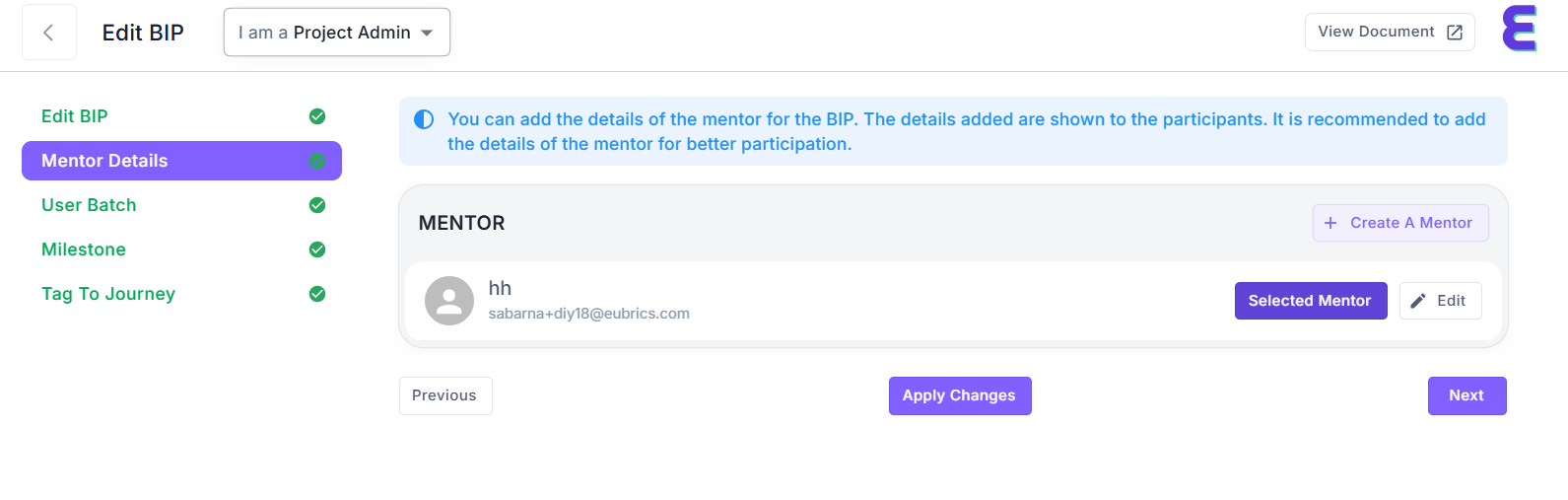
| Section | Description |
|---|---|
| Mentor Box | Displays the currently selected mentor |
| Create A Mentor | Opens the form to create a new mentor |
| Selected Mentor | Marks this mentor as active for the BIP |
| Edit | Allows changes to mentor details |
| Apply Changes | Confirms and saves mentor assignment |
¶ Best Practices for Mentor Setup
- Choose mentors with relevant subject matter expertise.
- Use professional and clear mentor names (e.g., QA Coach – Ajay Verma).
- Assign a mentor early so that they can prepare engagement material if needed.
- Ensure the mentor is aware of their role, dates, and expectations.
¶ Mentor Role Expectations
| Role | Responsibility |
|---|---|
| Guide | Help participants understand objectives |
| Monitor | Track participant progress, if needed |
| Motivate | Keep learners engaged through updates or nudges |
| Communicate | Respond to questions via platform tools or emails |
¶ Navigation Controls
| Button | Action |
|---|---|
Previous |
Go back to the Edit BIP (Title/Date) screen |
Apply Changes |
Save mentor selection |
Next |
Move to User Batch screen |
¶ Need Help?
- 📩 Email: support@eubrics.com
- 🔗 Use the “View Document” link at the top right for platform-level user guides.
Adding a mentor ensures that participants always have a human anchor throughout their upskilling journey. It's a small step that leads to large performance outcomes. Make it count!
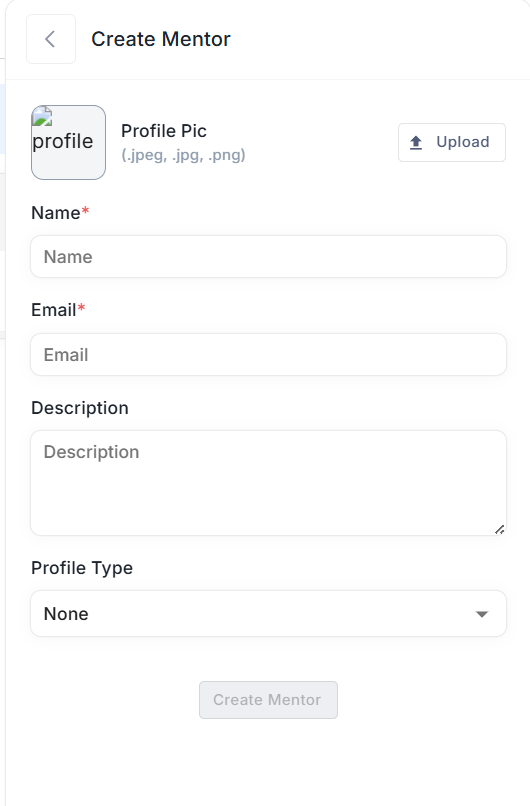
¶ Create Mentor – Form Overview
This is the interface for creating a new mentor profile within the Eubrics platform. It allows Project Admins to input key information needed to register a mentor and assign them to Business Improvement Plans (BIPs) or other relevant areas.
¶ Fields Explained
| Field | Description |
|---|---|
| Profile Pic | Upload a profile picture for the mentor. Accepted formats: .jpeg, .jpg, .png. |
| Name | Full name of the mentor (Required). |
| Valid email address of the mentor (Required). | |
| Description | Optional description or bio for the mentor. This helps others understand their background or role. |
| Profile Type | Dropdown to select the type of mentor profile (e.g., Coach, Reviewer, etc.). |
¶ Actions
- Upload Button: Click to upload a profile picture.
- Create Mentor Button: Once all required fields are filled, this button becomes active to save the mentor.
¶ Notes
- All required fields (marked with *) must be completed to proceed.
- The form prevents submission unless both Name and Email are filled.
- Profile picture is optional but recommended for better identification.