¶ Eubrics BIP Guide – Step 5: Tag to Journey & Modules
The final step in configuring your Business Improvement Plan (BIP) is to tag relevant Journeys and Modules. This step links the learning journey and its educational content to the specific BIP.
¶ What Is a Journey in Eubrics?
A Journey in Eubrics is a structured learning path made up of modules (activities, lessons, or topics) aligned to skill development goals. Tagging a journey ensures participants in the BIP experience relevant content.
¶ Where You Are Now
You’ve completed the following steps:
¶ Interface Breakdown
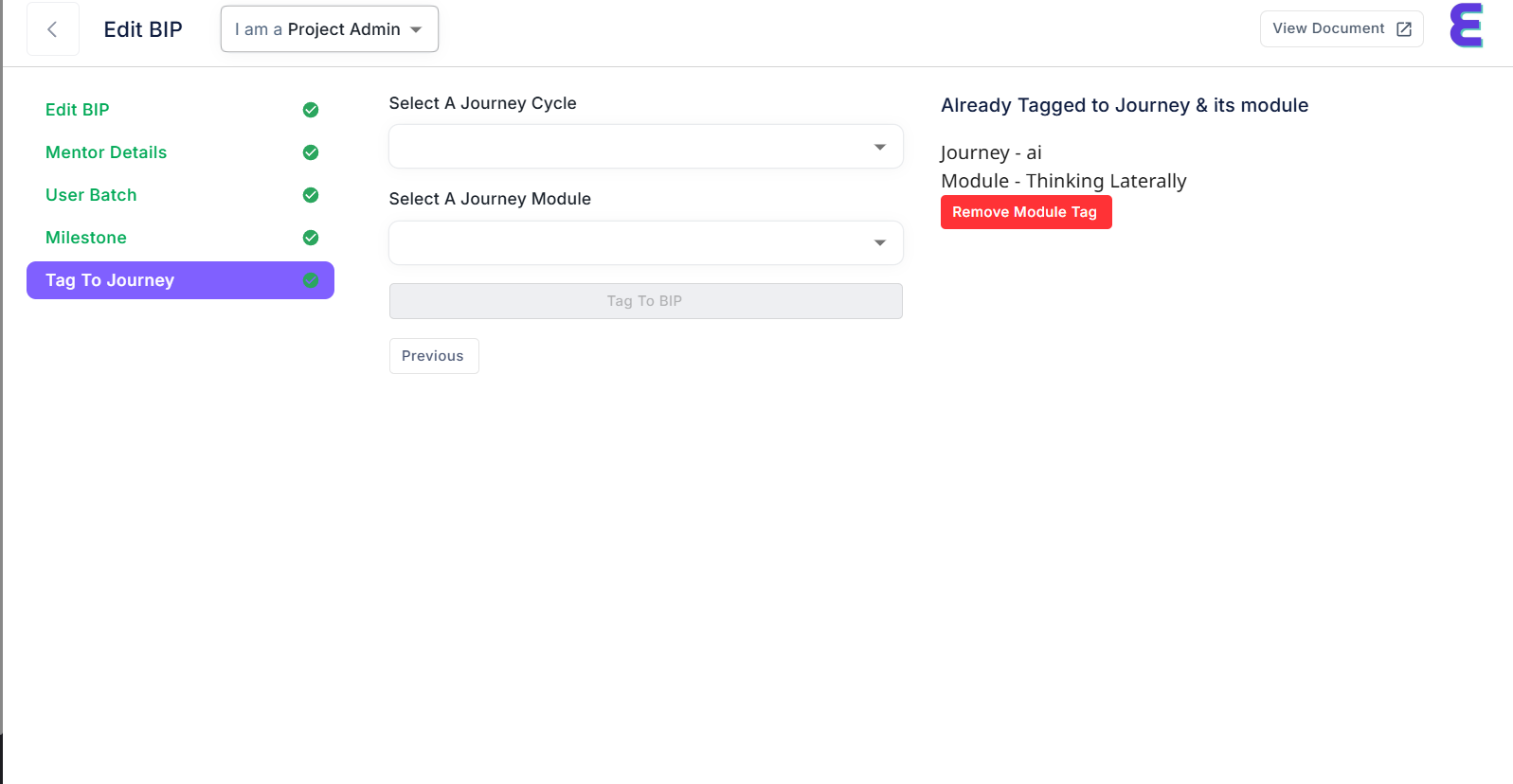
The “Tag To Journey” screen has two main sections:
| Section | Description |
|---|---|
| Left Side | Journey selection inputs |
| Right Side | Already tagged journey + modules |
¶ Journey Tagging: Step-by-Step
¶ 1. Select a Journey Cycle
This dropdown contains available journey tracks for your organization.
Example: ai, emotional_intelligence, growth_mindset
What is a Journey Cycle?
A themed or categorized learning track, grouping several modules.
¶ 2. Select a Journey Module
Once you choose a journey cycle, the next dropdown will be populated with modules related to it.
Example:
- Thinking Laterally
- AI Basics
- Collaborative Communication
Select the desired module from this list.
¶ 3. Tag to BIP
After selecting both fields:
- The “Tag To BIP” button becomes active.
- Click it to associate the chosen journey and module with your current BIP.
Success: The module now appears on the right under “Already Tagged to Journey & its module”.
¶ Already Tagged Modules
On the right-hand side, you’ll see all previously tagged journey-module pairs.
¶ Example:
Each tag includes a red “Remove Module Tag” button that allows you to delete the module from the BIP if it’s no longer needed.
¶ Removing a Tagged Module
If a module is no longer relevant:
- Simply click the red “Remove Module Tag” button.
- It is instantly removed from the active BIP.
¶ Navigation Controls
| Button | Action |
|---|---|
Previous |
Go back to Milestone setup |
View Document (top-right) |
Opens the help/documentation for journeys |
Tag To BIP |
Links selected module to the BIP |
¶ Best Practices
- Tag multiple modules for a more holistic learning experience.
- Remove outdated modules that no longer serve learning goals.
- Keep journey themes consistent with your BIP objectives.
- You can revisit this step to add/remove modules anytime before launching the BIP.
¶ Example Use Case
Suppose you're building a BIP focused on innovation and problem-solving.
You can select the Journey Cycle:ai,
Then choose the Module:Thinking Laterally,
Click Tag To BIP, and it gets added to your program!
¶ Need Help?
- support@eubrics.com
- Click “View Document” (top-right corner) for detailed help guides.
You're now done tagging journeys! Once this is complete, your BIP is fully configured and ready for launch!