¶ How to Edit Assessment Cycle
Editing an assessment cycle allows you to update key details such as the assessment name, types, batch selection, and timelines. Follow these steps to make changes to an existing assessment cycle.
¶ Steps to Edit an Assessment Cycle
-
Navigate to the Assessment Cycle Section
- Go to the "Assessment Cycles" page in the platform.
- Select the assessment cycle you want to edit.
-
Modify the Assessment Details
- Assessment Cycle Name: The name of the assessment cycle is unchangable.
- Assessment Types: Choose the type(s) of assessment (e.g., Potential, Preference).
-
Select Batch
- Choose the batch of users for the assessment cycle. Example: Batch 2.
-
Adjust Timelines
- Do Not Start Until: Set the start date and time (e.g., 09-01-2025 00:00).
- Deadline: Set the deadline for completion (e.g., 15-01-2025 00:00).
-
Save Changes
- Click on the Update button to save your modifications.
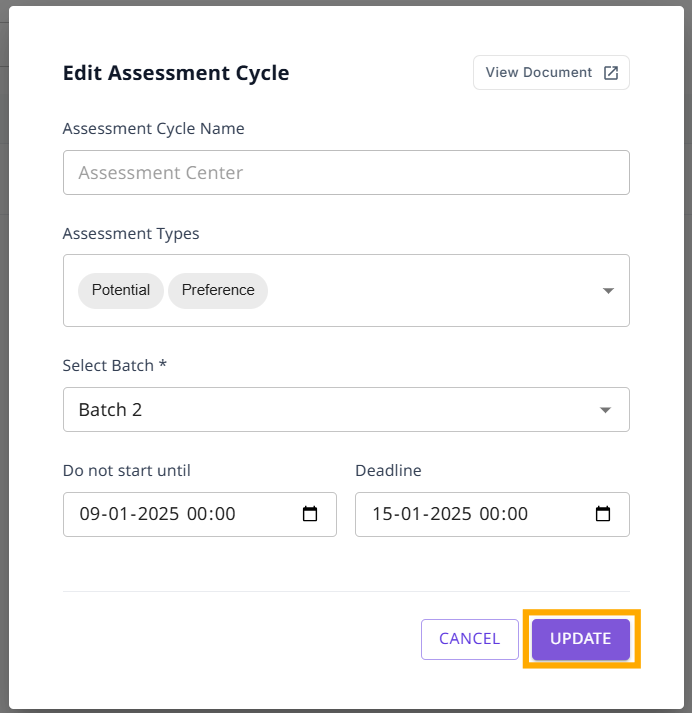
- Click on the Update button to save your modifications.
Once updated, the assessment cycle will reflect the changes, and participants will be notified accordingly.
¶ Related Links:
View Assessments