¶ Eubrics – Project Admin Dashboard: Complete Detailed Overview
This guide gives you in-depth explanations for every part of the Eubrics dashboard as seen by a Project Admin. Whether you’re new or experienced, this will help you understand how to use every feature and what each number and section means for your organization.
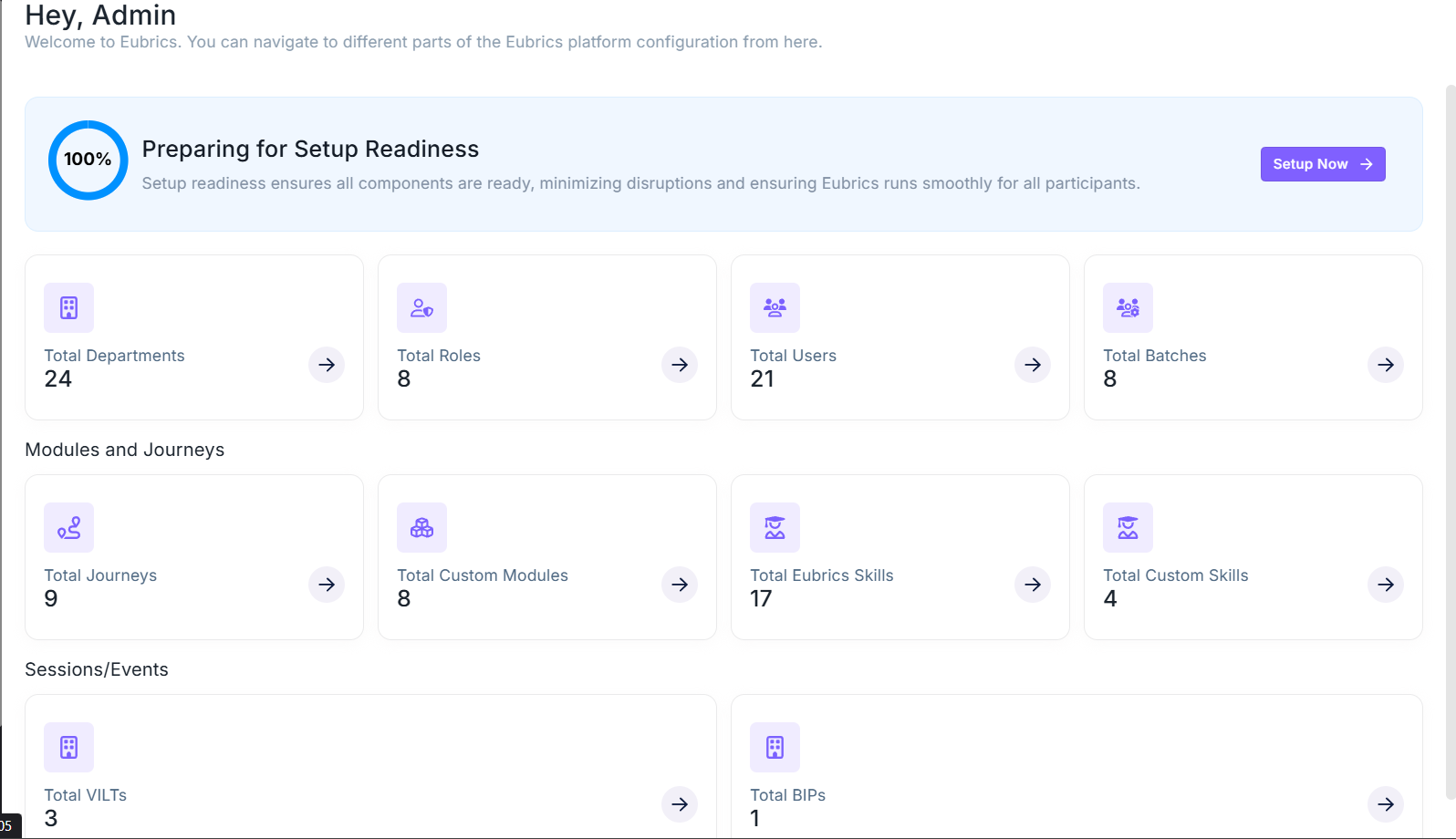
¶ 1. Welcome & Setup Readiness
¶ Welcome Message
- Displays "Hey, Admin" to greet you, confirming your admin role.
- Below the message, a short note welcomes you to Eubrics and reminds you that you can access all the major parts of the platform from here.
¶ Setup Readiness Section
-
Progress Circle (100%):
Shows instantly if your platform is fully set up. If not at 100%, it highlights the missing steps. -
Status Text ("Preparing for Setup Readiness"):
Explains that setup readiness means all parts are connected. A complete setup prevents user issues and ensures a smooth experience. -
Setup Now Button:
If setup is incomplete, click this purple button to launch an on-screen step-by-step guide to help you finish the process.
¶ 2. Core Organizational Data Cards
Each card gives a quick overview of a vital component of your platform. These are grouped into themed categories:
¶ (A) Organization Structure
-
Total Departments
- What it is: All organizational units (e.g., HR, IT, Finance).
- Why it matters: Assign users, roles, skills, and journeys by department.
- Sample value: 24
-
Total Roles
- What it is: Defined access levels (Project Admin, Mentor, Learner, etc.).
- Why it matters: Controls visibility, navigation, and data access.
- Sample value: 8
-
Total Users
- What it is: Everyone registered on the platform.
- Why it matters: Tracks adoption, user base, and engagement.
- Sample value: 21
-
Total Batches
- What it is: User groups used for training, projects, or programs.
- Why it matters: Useful for content targeting and cohort-based learning.
- Sample value: 8
¶ (B) Modules and Journeys
-
Total Journeys
- What it is: Structured learning/development paths.
- Why it matters: Ensures learning is sequenced and goal-driven.
- Sample value: 9
-
Total Custom Modules
- What it is: Learning modules tailored for your organization.
- Why it matters: Increases relevance and supports internal frameworks.
- Sample value: 8
-
Total Eubrics Skills
- What it is: Skills from Eubrics’ standard competency library.
- Why it matters: Supports benchmarking and universal standards.
- Sample value: 17
-
Total Custom Skills
- What it is: Skills created specifically by your company.
- Why it matters: Reflects internal processes, tools, and values.
- Sample value: 4
¶ (C) Sessions/Events
-
Total VILTs (Virtual Instructor-Led Trainings)
- What it is: Live online sessions for real-time instruction.
- Why it matters: Enables instructor interaction, Q&A, and collaboration.
- Sample value: 3
-
Total BIPs (Business Improvement Plans)
- What it is: Active plans aimed at driving business or project improvements.
- Why it matters: Helps structure change, assign ownership, and track progress.
- Sample value: 1
¶ 3. Navigation and Actions
-
Click Arrow (→) on Any Card:
Instantly opens detailed views to manage, edit, or track performance for each item. -
Mobile Responsive Design:
Fully functional on tablets and smartphones for on-the-go access. -
Real-time Updates:
Dashboard numbers update live so you always see the latest data.
¶ 4. Why This Matters
-
Centralized Oversight:
Monitor your organization's learning structure, engagement, and readiness in one place. -
Readiness Assurance:
Use the Setup Readiness tracker to identify and resolve gaps quickly. -
Smart Planning:
Detect missing modules, underused batches, or unassigned users to optimize training. -
Easy Navigation:
The dashboard doubles as a control panel—manage your learning ecosystem from one screen.
¶ 5. Pro Tips for Eubrics Project Admins
- Regularly check the dashboard after adding staff or new content.
- Keep departments, roles, and skills updated for accurate reporting.
- Leverage custom modules and skills to match your company’s specific needs.
- Never skip Setup Readiness—the "Setup Now" button is your best friend.
¶ 6. Common Issues Solved with the Dashboard
-
Missing users or low batch count?
Add users or assign them to batches from the relevant sections. -
Too few skills or modules?
Create more or ask subject matter experts to contribute. -
BIPs inactive or low?
Encourage teams to start Business Improvement Plans to boost growth. -
Users confused or stuck?
Check if all roles and departments are set correctly.
¶ 7. All Data At A Glance
- 24 Departments
- 8 Roles
- 21 Users
- 8 Batches
- 9 Journeys
- 8 Custom Modules
- 17 Eubrics Skills
- 4 Custom Skills
- 3 VILTs
- 1 BIP
With this detailed guide, you’ll unlock every feature and insight possible as a Project Admin in Eubrics—making your organization smarter, faster, and better coordinated than ever before.