¶ HTML Editor Features
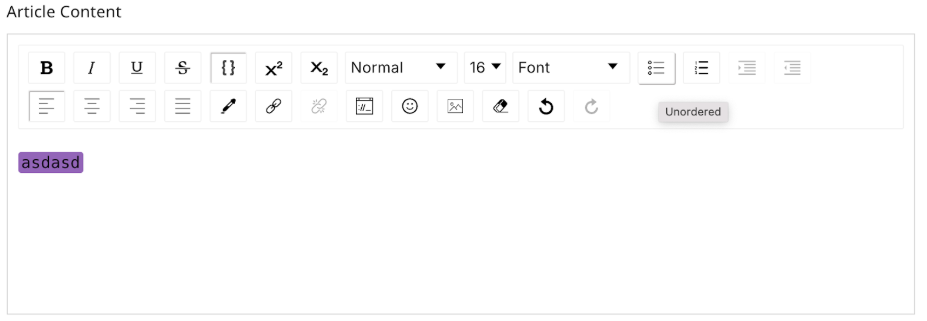
The HTML editor is a versatile tool designed to help you format text, structure content, and add visual elements effortlessly. With a wide range of options, it provides flexibility to create engaging and professional content. Here's a detailed list of features available:
¶ Text Formatting Options
- Bold: Highlight important text by making it bold.
- Italics: Emphasize text using italics.
- Underline: Underline text to add focus.
- Strikethrough: Show edits or removed content with strikethrough.
- Monospace/Code: Use for technical text or code snippets.
- Superscript: Add superscript text, ideal for formulas or references.
- Subscript: Create subscript text, useful for chemical formulas or footnotes.
¶ Text Type and Styling
- Text Types: Choose between Normal text, Headings (H1-H6), Blockquote, and Code formats.
- Font Size: Adjust the size of the text as needed.
- Font Family: Select from various font styles to match your content's tone.
¶ List and Alignment Options
- Bullets: Create unordered lists with bullet points.
- Numbered Bullets: Organize content with ordered, numbered lists.
- Indent/Outdent: Adjust text indentation to structure your content effectively.
- Text Alignment: Align text to the left, center, right, or justify for a professional appearance.
¶ Colors and Highlights
- Text Color: Change the text color to match your theme or emphasize specific points.
- Highlight Color: Add background color to highlight text.
¶ Links, Images, and Smileys
- Links: Insert hyperlinks to add references or direct users to other content.
- Images: Add images via URL (uploads are not supported). Ensure your images are accessible online.
- Smileys: Include emojis to add a touch of personality to your content.
¶ Undo/Redo Actions
- Undo: Reverse your last action for quick corrections.
- Redo: Reapply the last undone action for efficiency.
With these features, the HTML editor ensures you can create polished, structured, and visually appealing content for any purpose.