¶ Module Tagging
¶ Module Cycles: A Streamlined Way to Assign Learning
Module Cycles enable the assignment of learning modules directly to employees in a flexible, scalable, and tailored manner. This approach is particularly beneficial for onboarding and ongoing training when participants join at different times or require customized content.
Module cycles can be assigned to one user individually or to a batch of users as per your need.
¶ Steps to Create a Module Cycle
- Choose a Module and Unlocking Pattern
- Module: Select the learning module you want to assign.
- Unlocking Pattern: Define how the module content will be unlocked (e.g., all-at-once or sequential).
- Assign Users or Batches
- Individual Assignment: Choose specific users to assign the module to.
- Batch Assignment: Assign the module to pre-defined groups or teams.
- Bulk Upload: Upload a list of users in bulk via an Excel file for quick and efficient assignment.
- Set Start and End Dates
- Choose the start date and end date for the module cycle, determining when users begin and complete the module.
- Create the Cycle
- Once all fields are filled, click the Create Module Cycle button.
¶ Examples of Module Cycles in Action
¶ 1. Onboarding New Employees
- Scenario: New hires join in multiple batches over time.
- Solution: Assign modules tailored to the onboarding process, such as company policies, tools training, and role-specific knowledge, with a timeline that matches their start date.
- Unlocking Pattern: Content is unlocked sequentially, guiding new hires through each phase of onboarding.
¶ 2. Role-Based Upskilling
- Scenario: A sales team needs training on a new product line.
- Solution: Assign a product knowledge module to all sales representatives, with deadlines aligned to the product launch timeline.
- Unlocking Pattern: Content unlocks weekly, covering different aspects of the product, ensuring gradual yet thorough learning.
¶ 3. Team-Specific Training
- Scenario: The marketing and engineering teams need distinct training.
- Solution: Assign modules tailored to each team's needs, such as "Content Strategy 101" for marketing and "Agile Practices" for engineering.
- Unlocking Pattern: Teams access content simultaneously but tailored to their departmental requirements.
¶ 4. Recurring Compliance Training
- Scenario: Employees across departments must complete an annual compliance course.
- Solution: Assign the compliance module to all employees, with a common start date and a firm deadline for completion.
- Unlocking Pattern: The full module is unlocked immediately for rapid access.
¶ 5. Continuous Learning for Leadership Development
- Scenario: Mid-level managers are enrolled in a leadership development program.
- Solution: Assign a module that includes case studies, role-play scenarios, and reflection exercises.
- Unlocking Pattern: Sequential unlocking ensures managers complete one topic before progressing to the next.
¶ Benefits
- Scalable: Easily assign learning modules to any number of participants.
- Customizable: Tailor modules to meet individual, team, or organizational needs.
- Structured Progress: Clear timelines ensure learning objectives are met.
By aligning learning modules with participants’ roles, teams, or specific objectives, Module Cycles make it easier to deliver relevant and impactful training, no matter the scale or complexity.
¶ How to create a module cycle and tag users to it?
To create a new journey instance, follow these steps:
-
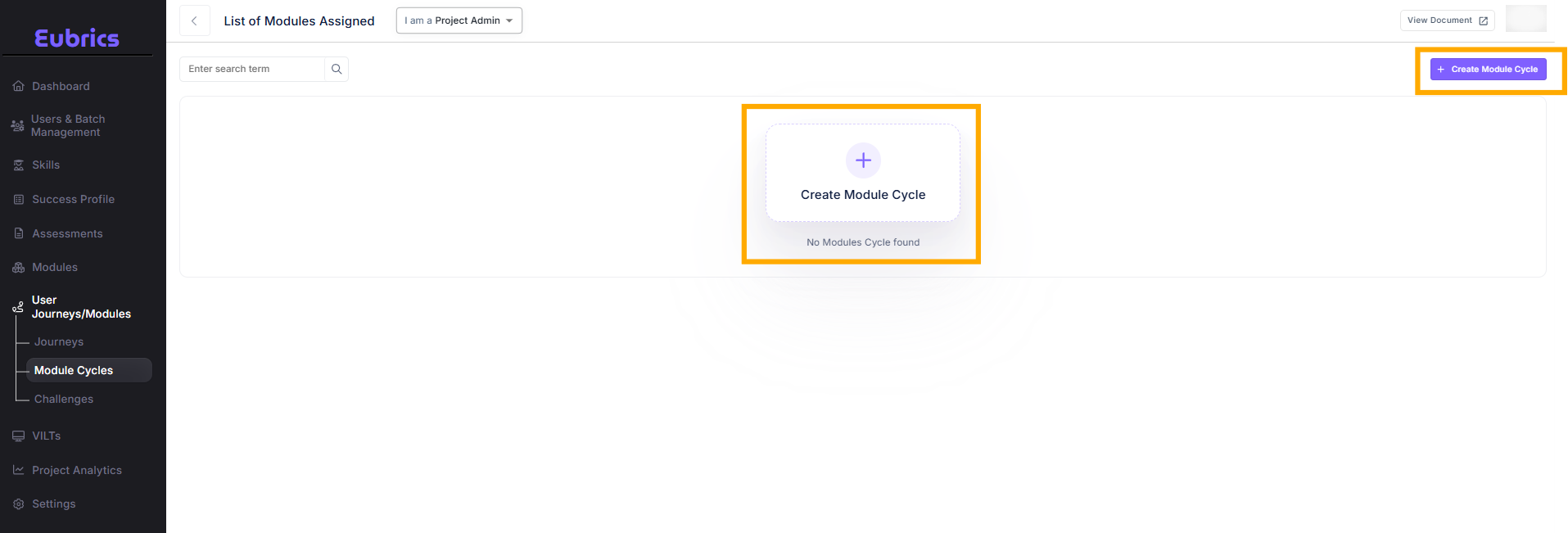
Navigate to the "User Journeys/Modules" Section:
- From the left-hand navigation menu, select User Journeys/Modules.
-
Click On Module Cycles:
- You will see a list of all existing module cycles or none(if you haven’t created any module cycle yet).
-
Click on Create Module Cycle
-
A form to create a module cycle will open up.
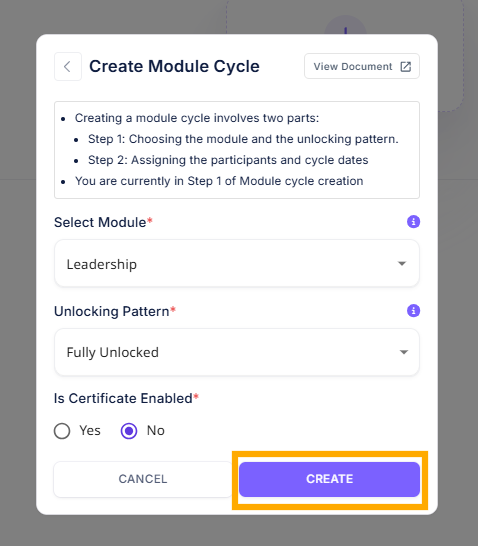
¶ Module Selection:
Pick the module that you want to assign
¶ Unlocking pattern:
Choose the unlocking pattern that you want to use. Read more about the different unlocking patterns here.
¶ Certificate Enablement:
Do you want to provide a certificate to the participant for completing the module.
Once you complete the form, a module cycle will be created.