¶ How to Tag VILTs to a Journey/Module
¶ Overview
Tagging a Virtual Instructor-Led Training (VILT) to a journey or module ensures that the training is structured within a learning path. This affects how users and buyers view the session.
¶ Steps to Tag a VILT to a Journey/Module
-
Navigate to the VILT Session
- Go to the "Edit VILT Session" page.
- Click on the "Tag Journey & Modules" tab.
-
Select a Journey Instance
- Use the dropdown menu to choose the appropriate Journey Instance.
-
Select a Journey Module
- Pick a specific module within the journey to associate with the VILT.
-
Tag to VILT
- Click the "Tag to VILT" button to save the association.
-
Updating the VILT Session
- Once tagged, click "Update VILT Session" to finalize the changes.
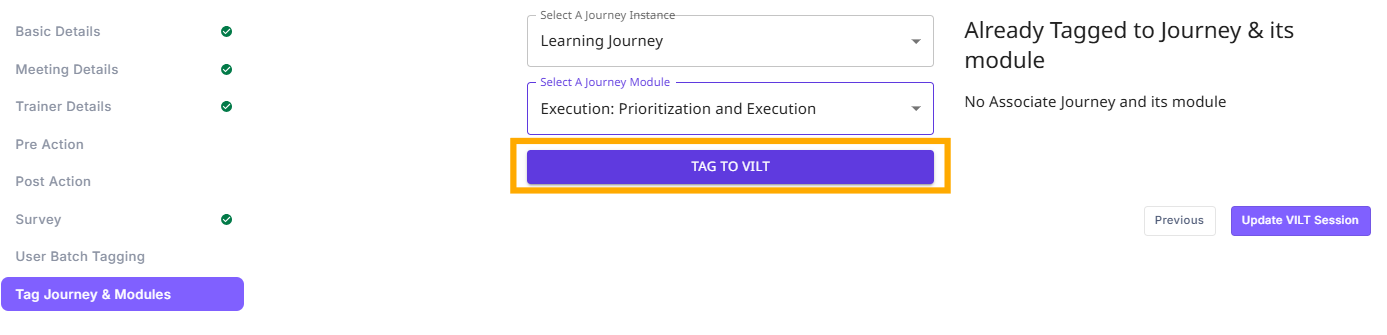
- Once tagged, click "Update VILT Session" to finalize the changes.
¶ What Happens After Tagging?
- If the VILT is tagged to a journey/module, it is structured within a predefined learning path.
- If it is not tagged, it remains an independent session without a structured learning path.
¶ User vs. Buyer Side Impact
-
Value-Based Journeys:
- Reflected in the module for learners.
- Learners can see it as part of their structured learning path.
-
Upskill-Based Journeys:
- Not visible to users directly.
- Only the progress of the journey is shown.
- It reflects on the buyer’s dashboard.
¶ Additional Notes
- If a VILT is already tagged, the "Remove Module Tag" button appears, allowing detachment from the journey/module.