¶ Pulse Survey – Setup & Features
¶ How to Setup
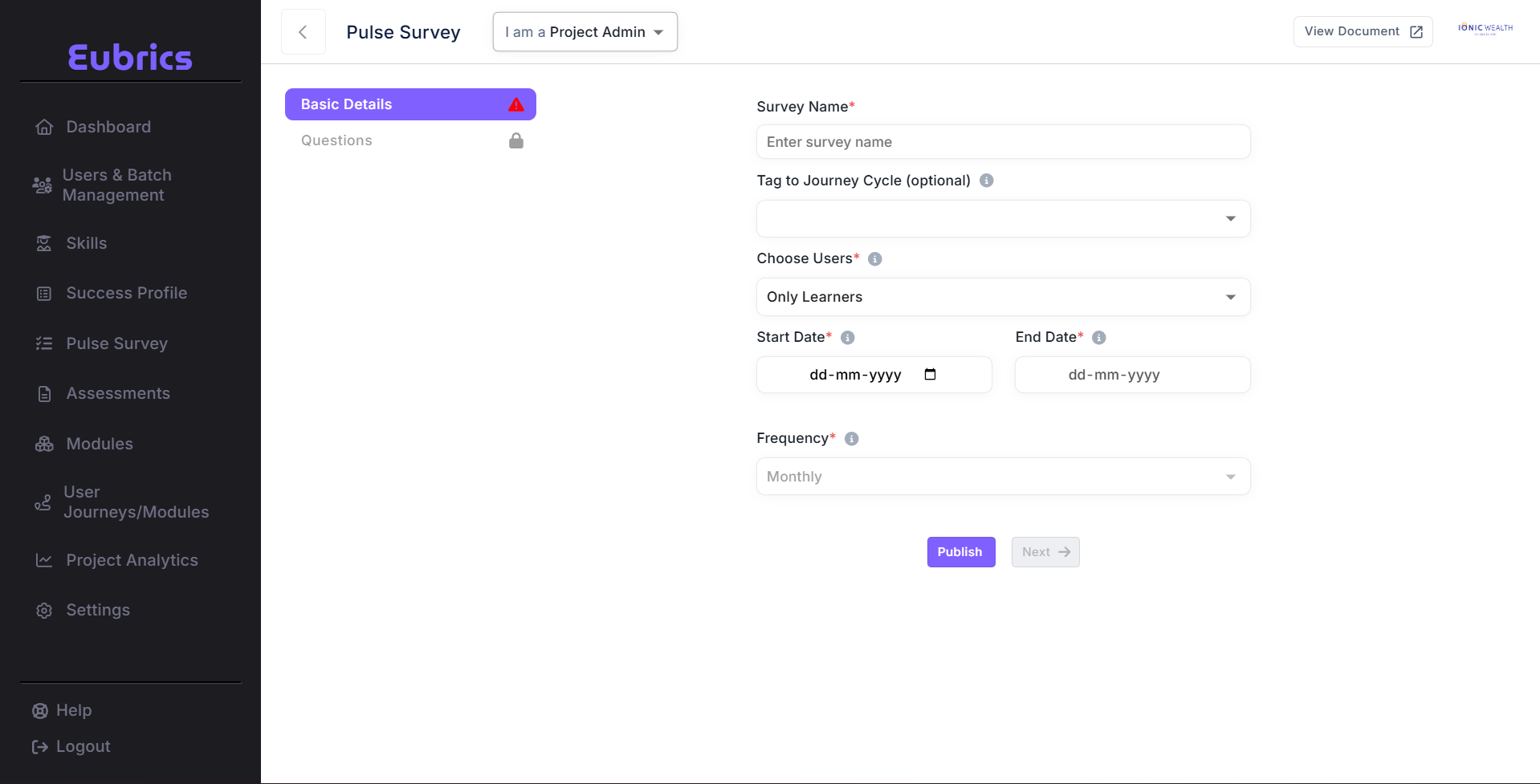
¶ Survey Name
Enter a name that clearly identifies the purpose of the survey (e.g., Mid Module Survey).
¶ Tagging to a Journey Cycle
Tagging is optional.
- If tagged, the survey will fetch start and end dates from the journey cycle and set the expiry duration automatically.
- The survey can be sent to journey-specific users as well.
¶ Choose Users
After tagging to a journey module, you can select which users will participate in the survey:
-
Only Learners
Collect feedback or self-assessment exclusively from learners. -
Only Managers
Allow managers to assess their teams without feedback from learners. -
Both Learners and Managers
Gather feedback from learners and allow managers to rate each user's progress.
¶ Start Date, End Date & Expiry
¶ 1. Start Date / End Date
-
Tagged to a Journey Cycle:
Auto-filled to match the journey timeline. -
Not Tagged to a Journey Cycle:
Must be entered manually. The survey will run from the selected start date to the end date.
¶ 2. Expiry Duration
-
Tagged to a Journey Cycle:
Automatically calculated based on the journey’s duration. -
Not Tagged to a Journey Cycle:
Can be set manually, defining how long the survey remains active.
Once a pulse survey expires, it is permanently closed and cannot be accessed again.
¶ Pulse Survey – Rating Question
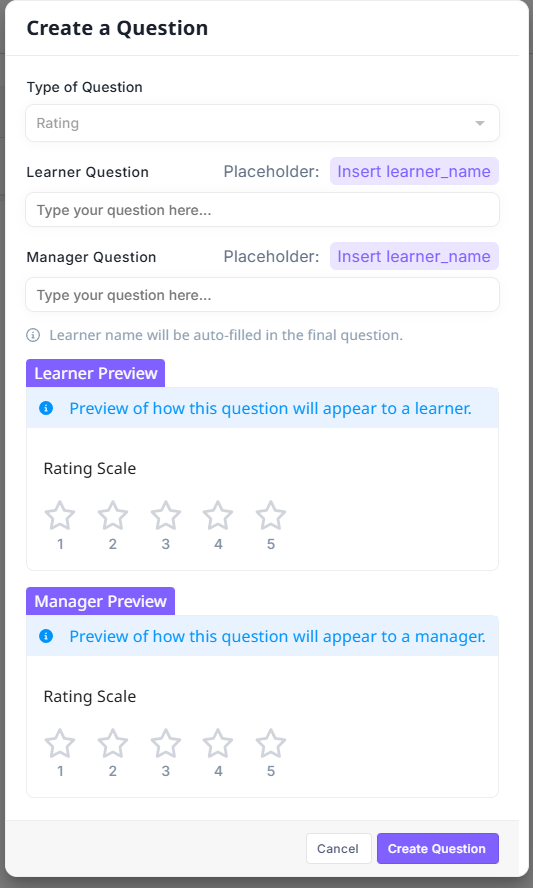
The Pulse Survey module allows creating feedback questions with a 5-point rating scale.
Survey questions can be tailored separately for learners and their managers, ensuring contextual feedback from both perspectives.
¶ Key Features
¶ Fixed 5-Point Rating Scale
Respondents can rate on a scale of 1 to 5 stars, where:
- 1 = Lowest rating
- 5 = Highest rating
¶ Separate Learner & Manager Questions
-
Learner Question:
- Visible only to learners.
- Uses a placeholder
Insert learner_namewhich auto-fills the learner’s name.
-
Manager Question:
- Visible only to managers.
- Also supports
Insert learner_namefor personalization.
¶ Previews
Learner Preview shows how the question will appear to learners.
Manager Preview shows how the question will appear to managers.
¶ How to Create a Rating Question
- Navigate to Create a Question in the Pulse Survey module.
- Select Type of Question: Rating (defaulted to a 5-point scale).
- Enter the Learner Question text.
- Example: “How confident do you feel about applying what you learned, {learner_name}?”
- Enter the Manager Question text.
- Example: “How effectively is {learner_name} applying this skill on the job?”
- Review both Learner Preview and Manager Preview.
- Click Create Question to save.
¶ Example
-
Learner Question:
“On a scale of 1–5, how clear was the training content for you, {learner_name}?” -
Manager Question:
“On a scale of 1–5, how well is {learner_name} demonstrating the new skill in their daily work?”
¶ Notes
- The learner name placeholder (
{learner_name}) will be auto-filled dynamically in the final survey. - Both learners and managers will only see their respective versions of the question.
- Currently, only a 5-point rating scale is supported.