¶ Role
The Roles section allows the Admin to define and manage different levels of roles in the organisation.
Example Roles: Employee,Admin,Analyst,Manager,Team Lead.
¶ Important Notes
Ensure each employee is assigned to the appropriate Role to maintain smooth operations.
Each user can belong to only one role at a time.
It is critical to assign each user to a role. Users not tagged to any role may face issues in accessing their AI Mentor.
¶ Visibility and Impact
Impact of the role field for the Employees:
- Employees can view their assigned role in their profile.
- Based on the role the user belongs to, the Eubrics AI system generates default work scenarios that the employees will use for action cards
- This will not be applicable if you neither use Eubrics modules Eubrics Modules, nor create your own action cards Action Cards.
Impact of the role field for the Admins and Analysts:
- The dashboards and metrics provide different data points by roles
- The dashboards provide different data cuts for each role
¶ How to Create Roles
There are 2 ways to create roles.
- Creating Roles Individually
- Creating Roles in Bulk via Excel/CSV
¶ Creating Roles Individually
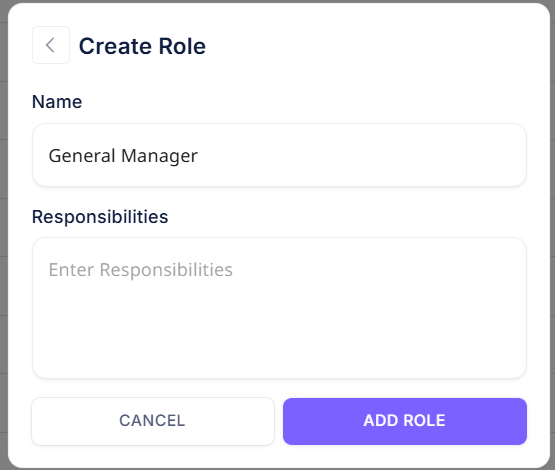
To create a new role click on the "Create Role" button.

Enter the name of the role and submit the page.
¶ Creating Roles in Bulk via Excel/CSV
You can also create multiple roles in one go using an excel upload. To do this:
step 1: click on the button "Upload Roles in Bulk" button.

Step 2: Upload the excel in the specified format.
You can download the sample format available to ensure that you upload the details correctly.
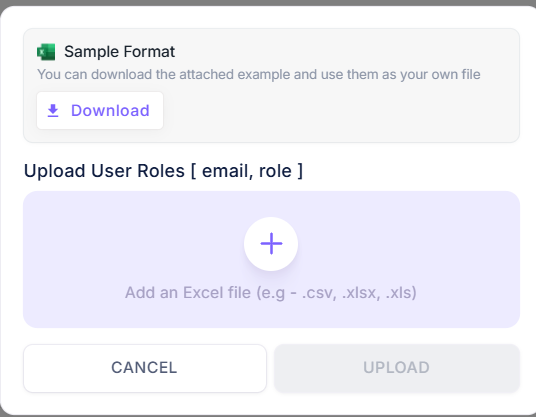
- Use "email" and "role" as the headings for the first two columns.
- List one email in the first column and one role in the second column per row.
- Ensure each row corresponds to a unique email-role combination.
¶ How to edit role name
To edit a role, you can choose the role that you want to edit from the list and click on the edit icon.

¶ How to delete role
To delete a role, you can choose the role that you want to delete from the list and click on the delete icon.
