¶ How to create journey cycles
Read more about what journey cycles are
Read more about what journeys are
To create a new journey cycle, follow these steps:
- Navigate to the "User Journeys/Modules" Section:
- From the left-hand navigation menu, select User Journeys/Modules.
- Click on "Journeys":
- You will see a list of all existing journeys.
- In each journey row, you’ll notice the number of journey cycles:
- If no cycles exist, you’ll see “0 cycles.”
- If one or more cycles exist, you’ll see “N cycles,” where N represents the number of cycles.
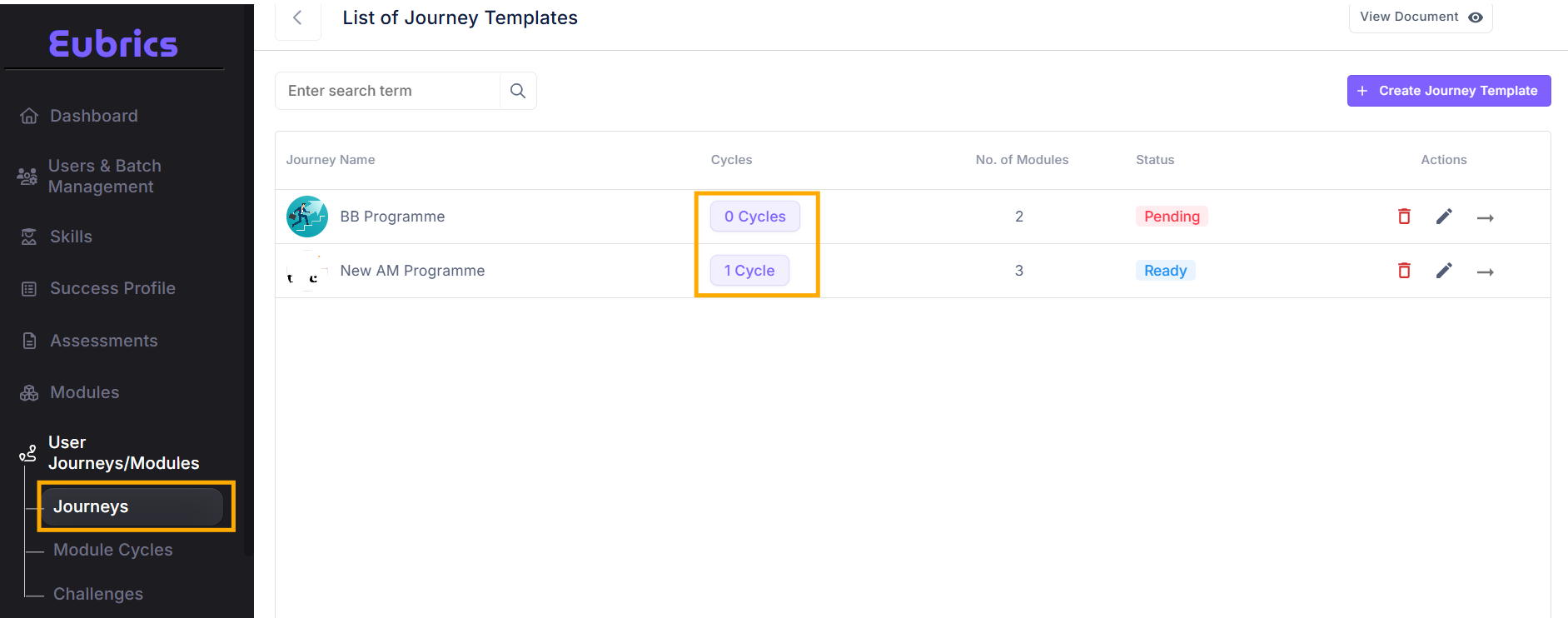
- Access the Journey cycles:
- Click on “0 cycles” or “N cycles” to open the journey cycles page.
- If cycles already exist, you will see a list of them.
- If no cycles have been created yet, you will see an option to Create cycle.
- Create a New cycle:
- Click on the Create cycle button to start creating a journey cycle.
- This action will open a form where you can fill in the required fields to configure and schedule the new cycle.
- Once you complete the form, the cycle will show up under the list of cycles for the journey.
¶ Explanation of each field in the form to create a journey cycle
Cycle Name
- Definition: A unique name to identify the specific cycle of the journey.
- Purpose: Helps differentiate between multiple cycles of the same journey.
- Example: "Sales Team Upskilling - Q1 2025"
Start Date
- Definition: The date when the journey cycle begins.
- Purpose: Marks the kickoff for all participants and modules within this cycle.
- Format: DD/MM/YYYY
- Example: 15/01/2025
End Date
- Definition: The date when the journey cycle concludes.
- Purpose: Indicates the deadline for completing all modules and activities.
- Format: DD/MM/YYYY
- Example: 31/03/2025
¶ Leaderboard Type:
Journey cycles support two types of leaderboards:
¶ 1. Journey-Level Leaderboard
- Description:
The entire journey has a single, unified leaderboard. Points accumulated across all modules are added to this common leaderboard. - Use Case:
- Suitable for journeys where each module is small (lasting 1–2 weeks).
- Ideal for journeys with fully unlocked and fully unlocked stepwise modules that do not
- Benefits:
- Encourages participants to view the journey as a cohesive experience.
- Simplifies tracking progress for shorter, straightforward modules.
¶ 2. Module-Level Leaderboard
- Description:
Each module has its own leaderboard. Points earned within a module contribute only to that module's leaderboard. When the module ends, the leaderboard and points reset for the next module, ensuring each module starts fresh. - Use Case:
- Suitable for longer modules (lasting 4–6 weeks).
- Ideal for that include action and habit splits, requiring sustained engagement.
- Benefits:
- Provides gratification and motivation at the module level.
- Keeps participants engaged over longer durations by offering more frequent recognition of achievements.
- Encourages participants to focus on individual module goals without being influenced by prior performance.
¶ Module wise dates:
When creating a journey cycle, you will need to configure the dates for each module assigned to the cycle. Here’s a step-by-step breakdown:
- Module Start and End Dates
- Fields:
- Overall Start Date: When the module begins.
- Overall End Date: When the module ends.
- Purpose:
Defines the module's duration within the journey.
- Fields:
- Phases for Habit-Based Modules
- For habit-based modules, you will see additional fields:
- Start Date of Learning Phase: The beginning of the learning phase.
- End Date of Learning Phase: The end of the learning phase.
- Start Date of Action Phase: The beginning of the action phase.
- End Date of Action Phase: The end of the action phase.
- Recommended Timeline:
- Learning phase: 1–2 weeks.
- Action phase: 21 working days (approximately a month).
- Purpose:
Separates the learning and application periods to ensure gradual and structured skill development.
- For habit-based modules, you will see additional fields:
- Module Feedback Deadline for Managers
- Field:
- Feedback Deadline: The date by which managers must provide feedback on the participant's performance in the module.
- Purpose:
If set, managers will receive a notification with a feedback form to evaluate their direct reports' progress and identify areas for improvement based on observations. - Importance:
Encourages manager involvement and ensures a feedback loop to assess the real-world application of skills learned during the module.
- Field:
¶ Key Recommendations
- Ensure all dates align with the journey's overall timeline.
- For habit-based modules, adhere to the recommended durations to maximize engagement and impact.
- Set a realistic deadline for manager feedback, allowing them adequate time to observe and evaluate participant progress.
¶ How to edit a cycle
¶ How to assign Users to a cycle
-
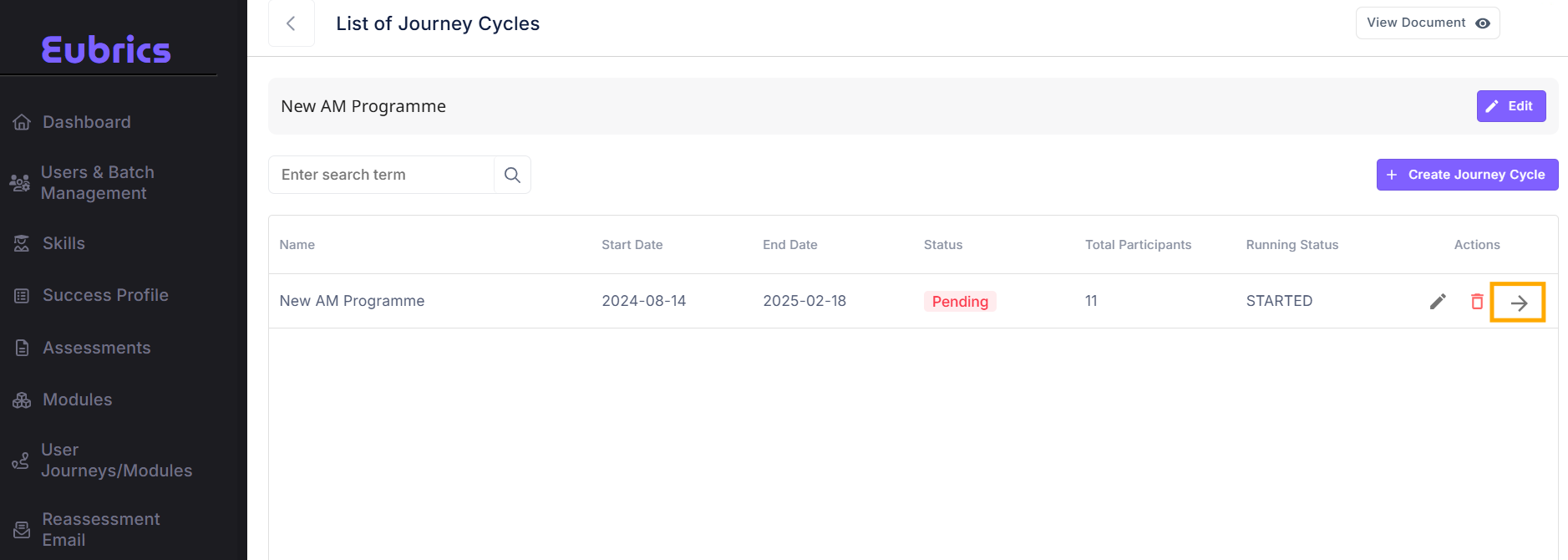
To assign users to a cycle, click on the cycle and enter the cycle details page
-
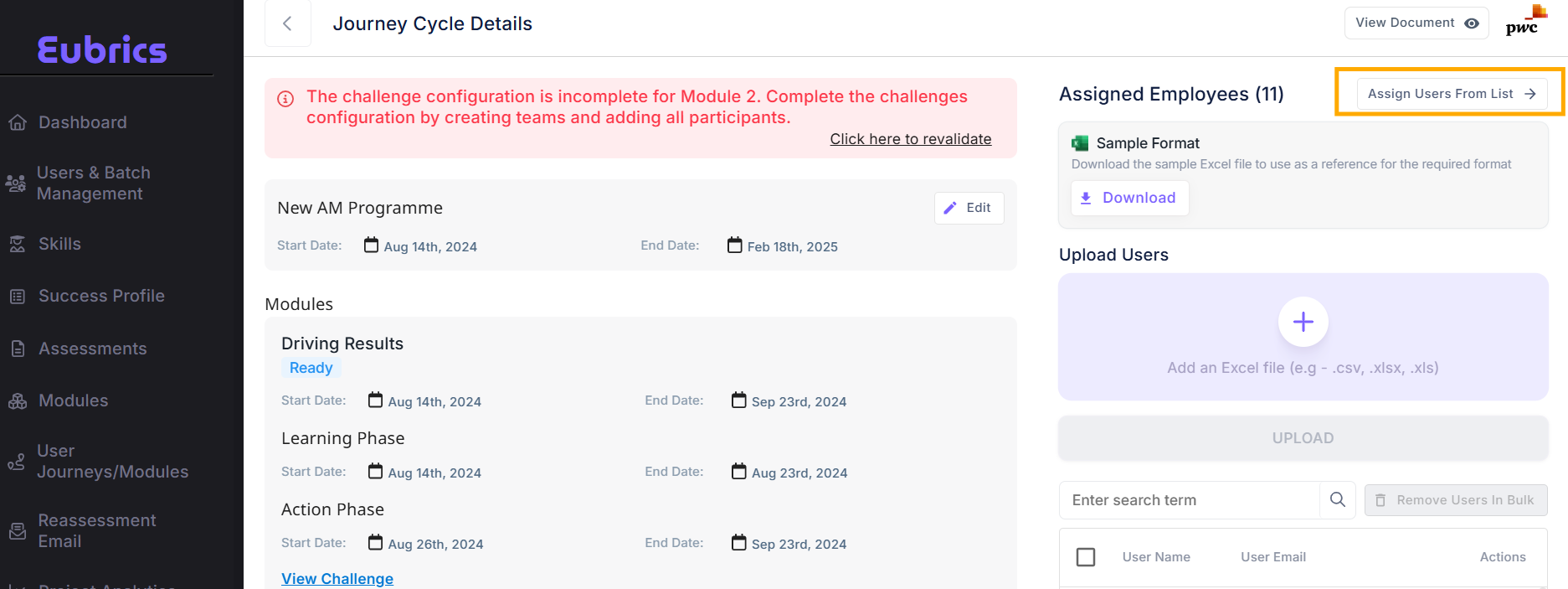
On this page, on the right side you will find a section called ‘Assigned Employees’
Under this section you can assign users to the journey cycle in 2 ways
- Assign users individually from a list
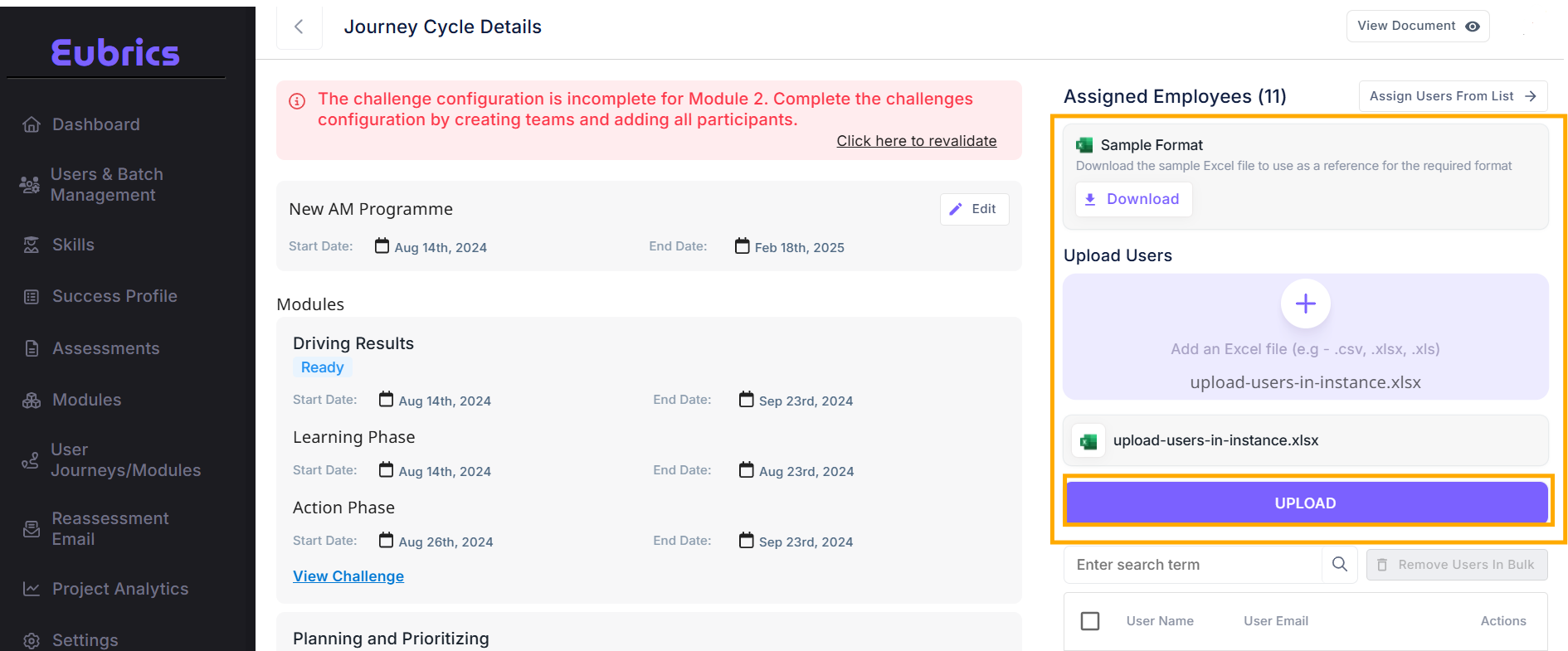
- Assign users via bulk upload
- To assign users individually from the list click on the button ‘Assign Users From List’
This will open a modal which will list out users from the project who do not belong to the cycle yet. You can pick one or more users and assign them to the cycle.
- To assign users via the bulk upload, download the sample format, and list out the user emails that you want to assign to the instance.
- You do not need to add all users to the cycle in one instance. You can do it in multiple iterations too if you like.
¶ Assigning Modules to IDP journey cycles for each participant
-
When one of the modules of the journey template has an IDP module, you will have to complete one more step.
-
When a module is an IDP module, you can tag different modules to each participant of the cycle. This allows different users to work on different modules while following a common schedule and gamification.
-
When a module is an IDP module, you will notice a label IDP module under the journey cycle details for the corresponding module. You will also find a button ‘Assign IDP’
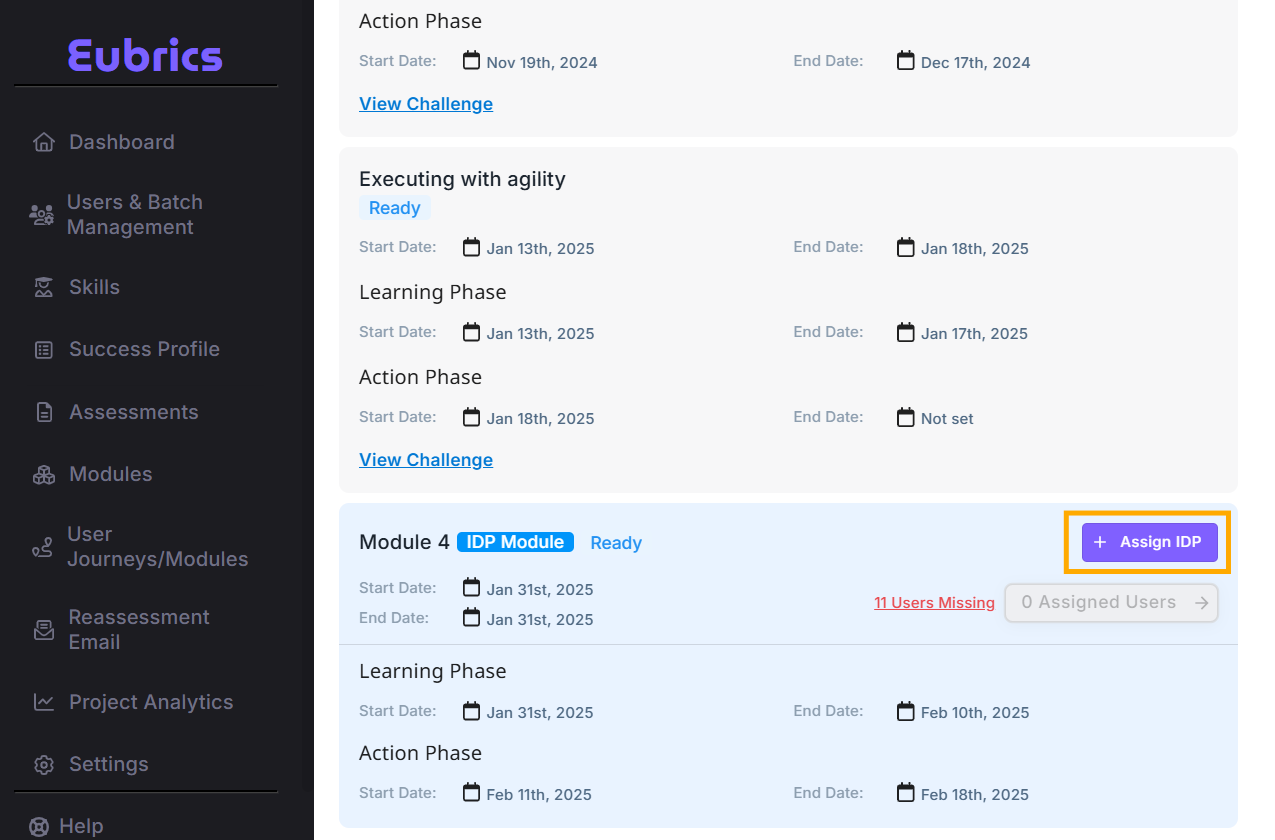
- When you click on Assign IDP, a modal will open up. This modal will allow you to assign different modules to each user via an excel/csv upload. The required format of the excel upload file can be found in the same modal.
- Until all the participants are assigned a module, the cycle will not be ready. Though you can launch the cycle without assigning IDPs to all participants, we recommend not to. This is because, the participants without the IDP assigned will not be able to access the journey and will encounter unexpected behaviors on their login. The participants with the IDP module assigned will be able to proceed with their journey smoothly.
¶ How to create challenges and tag them to specific modules of a cycle
You can create challenges for different modules of a cycle to enable complete gamification for action based modules.
Read more about how to tag challenges to a module of a journey cycle