¶ How To Create Journeys
Creation of a journey is a two step process:
¶ Step 1: Create a Template
Define the journey template by selecting and sequencing the modules that participants need to complete. This serves as a structured blueprint, ensuring a logical progression of learning and activities.
¶ Journey Template:
A skeleton structure, like a course, containing all modules, configurations, and a general framework for learning.
¶ Step 2: Assign Cycles
Create one or more cycles from the template to assign the journey to specific batches. Configure start and end dates, personalize settings, and manage timelines for different groups to align with organizational and participant needs.
¶ Journey Cycle:
The application of a journey template, where it is assigned to specific individuals or batches with defined start and end dates for the journey and its modules.
¶ How to create a new journey
To create a new journey, follow these steps:
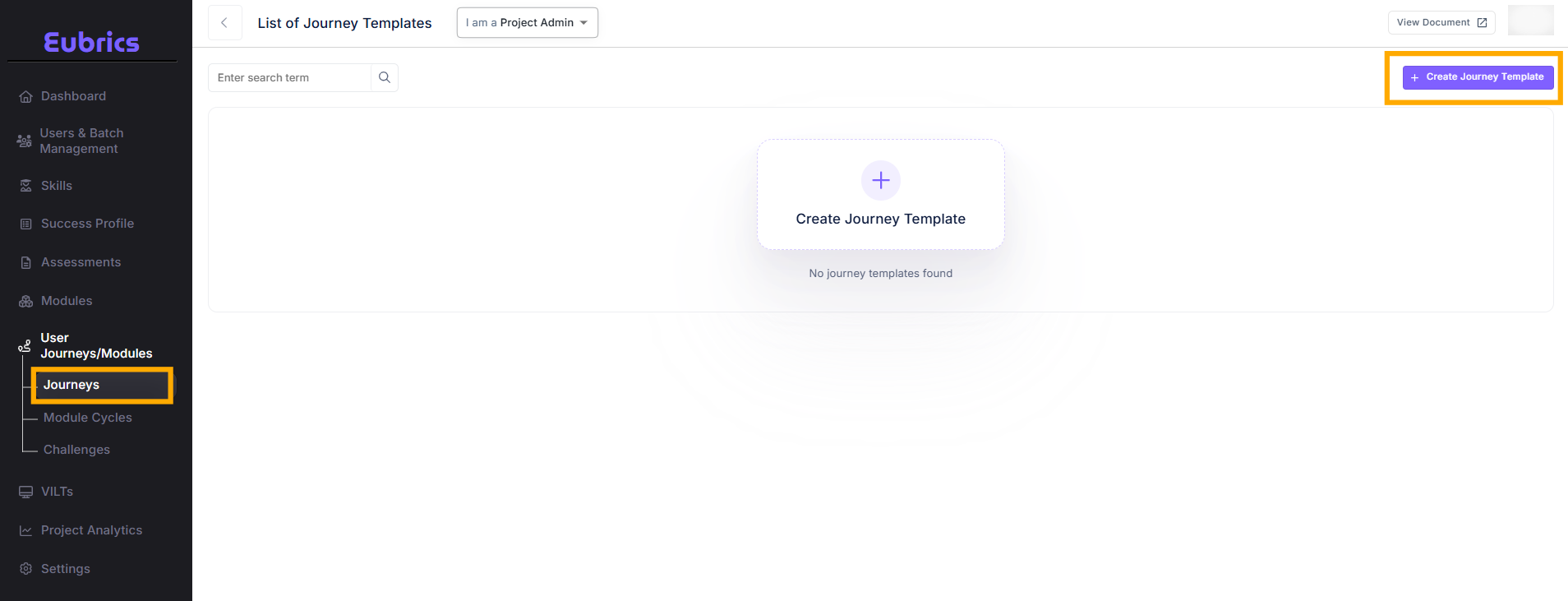
- Navigate to the "User Journeys/Modules" Section:
- From the left-hand navigation menu, select User Journeys/Modules.
- Click On Journeys:
- You will see a list of all existing journeys.
- Click on "Create Journey":
- Locate the Create Journey Template button at the top of the page.
- Click on it to open a modal window.
¶ Explanation of each field of the modal:
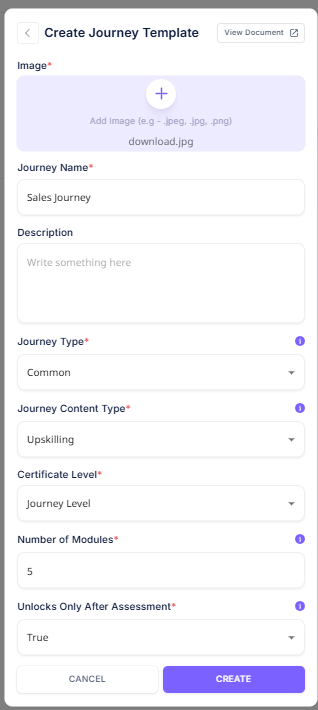
¶ Journey Name:
The title of the journey template, reflecting its purpose or focus (e.g., "Managerial Excellence Journey").
¶ Description:
A brief summary outlining the objective of the journey and the skills or outcomes it aims to achieve (e.g., "This journey equips new managers with the skills to lead teams, delegate tasks, and make effective decisions.").
¶ Image:
A representative image for the journey that visually communicates its theme or purpose (e.g., an image of a leader addressing a team for a managerial journey).
¶ Journey type:
Eubrics allows different types of journeys based on how it is assigned to the participants. Participants of a journey can work on the same or different modules within the journey as per your preference.
- Common
- This is a journey where all participants have to complete the same modules. This is suitable for journeys where all participants are from the same role such as newly promoted managers, senior developers, SDRs etc where the expectations from each participant are uniform.
- IDP
- Individual Development Plan(IDP) journeys allows different participants of the journey to work on different modules while following a common schedule.
- For example, if you want to initiate a common journey of 3 months for all your sales executives where each person works on a different module as per their development areas, you can use the IDP journey. This will allow one participant to work on Building Relationships, another participant to work on Negotiation, and so on while every one is following the same schedule to complete the journey.
- Level Based
- Level based journeys are for rolling out journeys where all participants are working on a common skill but each person works on the module as per their user level. This will ensure each participant improves their skill while working on content that is tailored to their user level.
- For example, if you want to initiate an organization wide initiative to improve Innovation, you can roll out a level based journey and tag the participants. This will ensure that an entry level person will work on the module which is at entry level, while a senior manager will work on the module which is at the Senior Level. This will ensure that all participants are offered modules which is tailored to their level.
¶ Journey Content Type:
Eubrics journeys are initiated to achieve two outcomes.
- To upskill employees at particular skills
- To drive value percolation within your organization
¶ Upskilling:
An upskilling journey contain different modules which are targeted to improve different technical and behavioral skills. An upskilling journey measures the skill score of the participant for each module/skill worked on.
Upskilling journeys involve tagging of different modules to the journey.
Learn more about upskilling journeys
¶ Value Based:
A value based journey can contain different modules where each module can is targeted at making your employees understand and live by the values of your organization. In a value based journey each employee gets an awareness score based on how well they have understood the value.
In a value based journey each module item needs to be tagged to a value via a tag. Value based journeys will unlock the feature of kudos based on your
Learn more about value based journeys
¶ Certificate Levels
Eubrics allows certificates to be assigned at two levels for participant recognition:
- Journey-Level Certificates:
- Participants receive a certificate upon completing the entire journey.
- Best suited for shorter journeys completed within weeks or a month.
- Module-Level Certificates:
- Participants earn certificates for each module completed.
- Ideal for longer modules spanning multiple weeks or months, providing regular gratification.
¶ Number of modules:
Number of modules control how many modules the journey will contain. You can choose any number that you consider suitable for your journey. Based on the number of modules you want to have, you will have to create the corresponding tagging and schedule for each module.
¶ Readiness State of a Journey Template
- Pending:
- A journey is in a pending state if its modules are not fully configured.
- To move the journey to a ready state, ensure all modules are configured. Refer to the Module Configuration section for detailed guidance.
- Ready:
- A journey is in a ready state when all its modules are fully configured and set up according to the required expectations.

¶ Module Configuration of a Journey Template
To configure the modules of a journey template, follow these steps:
- Access the Journey:
- Click on the arrow at the end of the journey row.

- Click on the arrow at the end of the journey row.
- View Module Slots:
- Once inside the journey, you’ll see a list of module slots created for the journey.
- Each module slot requires a specific module to be assigned.

- Assign or Edit Modules:
- Add Module: If a module slot has not been configured yet, you’ll see an Add Module button. Click it to assign a module.
- Edit Module: If a module is already configured, you’ll see an Edit Module button. Click it to make changes to the assigned module.
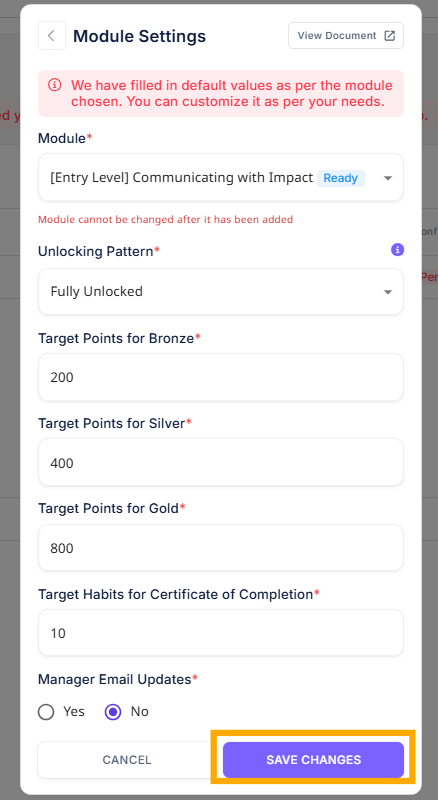
Assigning a module to a module slot
To assign a module to a module slot click on add module or the edit module button when you click on it a form will open up
¶ Explanation of each field of the module configuration form.
¶ Module:
This dropdown allows you to assign a specific module to the module slot:
- For Common Journeys:
- Assign one specific module to the slot, as all participants will work on the same module.
- For IDP Journeys:
- Choose the IDP option from the dropdown.
- Once selected, you can assign different modules to each participant based on their individual development needs.
- This enables an IDP journey where participants work on unique modules under the same journey and timeline.
¶ Unlocking pattern:
The unlocking pattern determines how the items within a module unlock. Eubrics allows different unlocking patterns to choose from:
- Fully unlocked
- In this pattern, all items of the module are unlocked. Participants can complete any item in the module in any order.
- Fully unlocked stepwise
- In this pattern, all items of the module are unlocked, but they need to be completed one at a time starting from the first item. Each item remains locked until the previous one is completed. Participants have to complete item 1, followed by item 2, and so on until they finish all the items.
- Daily unlocking
- This form of unlocking is used for habit based modules so that people form a new habit of the behavior by practicing one item daily.
- In this pattern, one item unlocks per day. Items unlock all days of the week including Saturdays and Sundays. On the first day, only 1 item will be unlocked and after completing the item, the participant will have to wait until the next day to complete the next item. But items unlock as per the start and end date without considering each participant’s completion. Participants visiting the module on the last day will have all items unlocked and can complete them in one go.
- Weekdays unlocking
- This form of unlocking is used for habit based modules so that people form a new habit of the behavior by practicing one item daily.
- In this pattern, one item unlocks per week day. Items unlock Monday to Fridays. Saturdays and Sundays are excluded where no items unlock. On the first day, only 1 item will be unlocked and after completing the item, the participant will have to wait until the next day to complete the next item. But items unlock as per the start and end date without considering each participant’s completion. Participants visiting the module on the last day will have all items unlocked and can complete them in one go.
- Weekly unlocking
- This form of unlocking is used for habit based modules so that people form a new habit of the behavior by practicing a few items each week.
- In this pattern, you can set up a preset number of items to unlock each week. On the first week, a certain number of items(configurable for each week) will be unlocked and after completing those items, the participant will have to wait until the next week to complete the next set of items. But items unlock each week as per the start and end date without considering each participant’s completion. Participants visiting the module on the last week will have all items unlocked and can complete them in one go.
¶ Manager Email Updates
This field determines whether managers should receive updates about participants' progress:
- Set to Yes:
- All managers of the participants will receive regular updates on module progress.
- Set to No:
- Managers will not receive any updates about participants’ progress.
¶ Reordering Modules
To reorder the module sequence:
- Click on the Reorder Modules button.
- Drag and drop modules to rearrange them.