¶ Adding Users to a VILT Session
¶ Overview
Adding users to a VILT (Virtual Instructor-Led Training) session is a straightforward process. However, users can only be added through batches and not individually.
¶ How to Add Users to a VILT
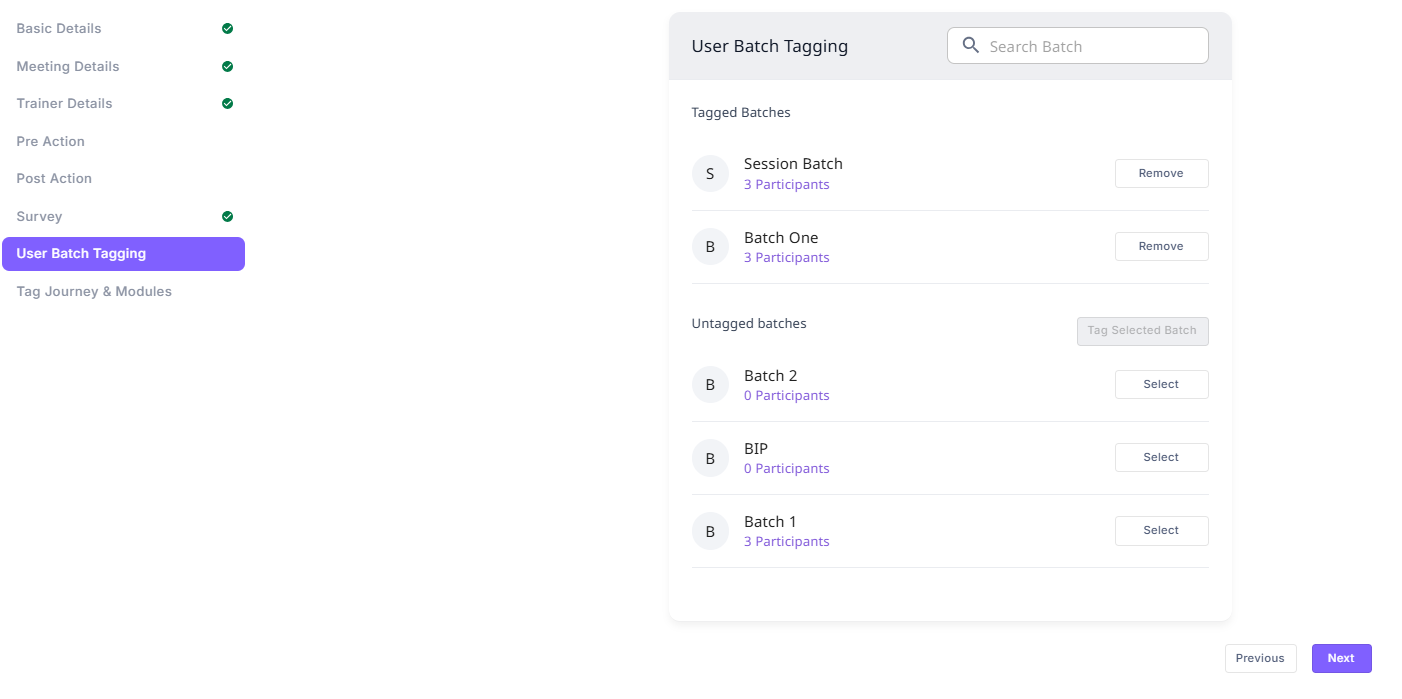
- Navigate to the User Batch Tagging section in the VILT session.
- You will see two sections:
- Tagged Batches: Batches already assigned to the VILT.
- Untagged Batches: Batches that are available for selection.
- Find the batch you want to add and click "Select".
- Click "Tag Selected Batch" to assign it to the VILT.
- Once tagged, all users in that batch will automatically be part of the VILT session.
¶ Adding Users Later to an Ongoing VILT
If a user needs to be added to an ongoing VILT session:
- They cannot be added individually.
- Instead, they should be added to a batch that is already tagged to the VILT.
- Once the user is part of the tagged batch, they will automatically become part of the VILT session.
¶ Managing Batches
- You can remove a tagged batch from the VILT if needed.
- Search for a batch using the search bar for quick access.
- Ensure all required users are part of the correct batch before tagging.