¶ Why Are VILT Surveys Needed?
VILT (Virtual Instructor-Led Training) surveys are essential for gathering feedback from participants on their learning experience. They help trainers and administrators assess the effectiveness of sessions and make data-driven improvements.
The data collected from surveys is displayed on dashboards, allowing for better analysis and decision-making.
¶ How to Create a New Survey
- Navigate to the Survey section in the VILT session.
- Click on "Create Survey".
- Enter a Title and Description for the survey.
- Add questions based on the available types.
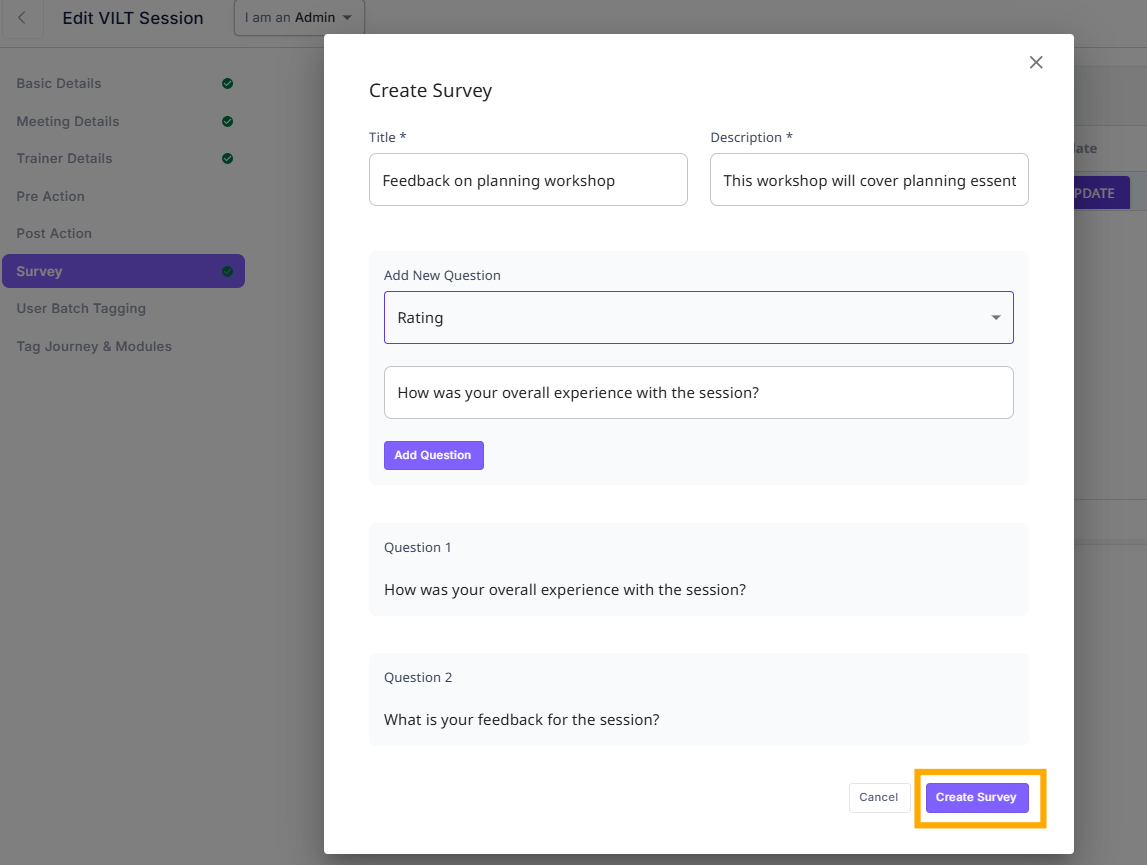 # Creating VILT Surveys
¶ Default and Custom Questions
-
Some default questions, such as:
- "How was your overall experience with the session?"
- "What is your feedback for the session?"
These cannot be modified or deleted.
-
You can add custom questions based on your requirements.
¶ Types of Questions
When adding a new question, you can choose from the following types:
¶ 1. Multiple Choice
- Participants select one or more options from a list.
- You can add multiple options.
- Useful for structured feedback.
¶ 2. Rating
- Participants provide feedback using a rating scale.
- Helps in quantitative assessment of the session.
¶ 3. Text
- Participants provide open-ended feedback.
- Useful for detailed responses.
¶ Where Do Surveys Appear in VILT?
- Surveys appear in the Survey section of the VILT session.
- Once created, they can be viewed and managed from the survey list.
- Participants complete the surveys after the session, ensuring relevant feedback is gathered.
¶ Managing Surveys
- You can update or delete existing surveys from the survey list.
- Only custom questions can be modified, while default questions remain unchanged.
- After confirming the survey, it will be available for users to complete.