¶ How to Add Meeting Details in VILT (Virtual Instructor-Led Training)
¶ Overview
The Meeting Details section allows you to set up key information about the VILT session, including the meeting link, passcode, location, and schedule.
¶ Steps to Add Meeting Details
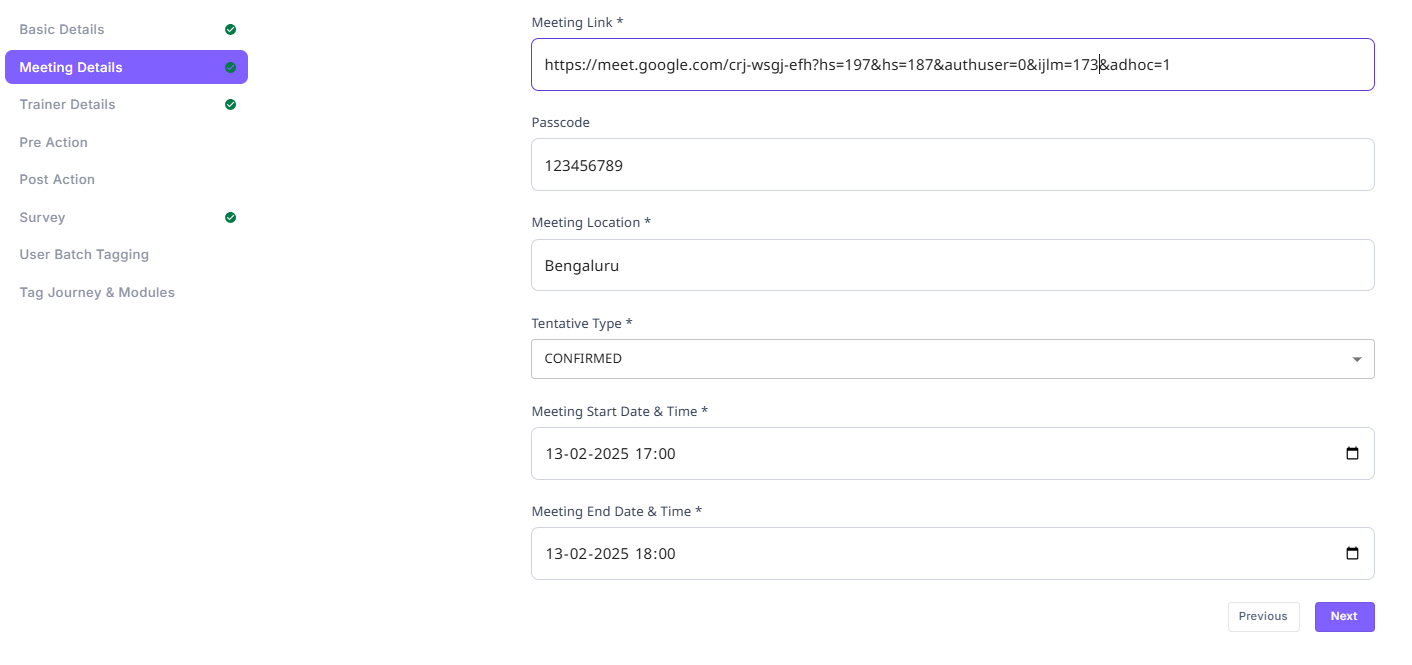
¶ 1. Navigate to the VILT Session
- Go to the VILTs section in the Eubrics platform.
- Select the VILT session for which you want to add meeting details.
- Click on the "Edit" button.
- In the left navigation panel, select "Meeting Details".
¶ 2. Fill in the Required Fields
¶ Meeting Link
- If the session is virtual, enter the meeting link (Zoom, Google Meet, MS Teams, etc.).
- If there is no online meeting, enter "NA".
¶ Passcode
- If the virtual meeting requires a passcode, enter it here.
- If no passcode is required, enter "NA".
¶ Meeting Location
- Specify the session location:
- For virtual sessions, enter "Online".
- For in-person training, specify the location (e.g., "Mumbai Office, Conference Room B").
- If the exact location is unknown, enter a general location (e.g., "Bangalore").
- If no location is applicable, enter "NA".
¶ Tentative Type
This determines how finalized the meeting details are. Select one of the following options:
- Confirmed: The date and time are fixed. Participants will see the exact schedule.
- Date and Time Not Confirmed: The session is planned, but the timing is yet to be finalized. Participants will see a "To be announced".
- Only Date Confirmed: The session date is fixed, but the exact time is undecided. Participants will be informed of the tentative with date, with time confirmation to follow.
¶ Meeting Start Date & Time
- Select the date and time when the session will begin.
¶ Meeting End Date & Time
- Select the date and time when the session will end.
- If the session spans multiple days, ensure that the Multi-Day Event option is enabled (from the previous section).
¶ 3. Save and Proceed
- Click the "Next" button to save the details and move to the next section.
¶ Important Notes
- If the session is virtual, ensure that the meeting link and passcode are provided.
- If the session is in-person, specify the meeting location.
- If the tentative type is not Confirmed, participants will see different status messages based on the selection.
- Multi-day events require proper date settings—start and end dates should not be the same.